http://www.cyberciti.biz/faq/howto-openssl-security-update-cve20150291-cve20150204-cve20150290-cve20150207-cve20150286/
How To Patch and Protect OpenSSL Vulnerability # CVE-2015-0291 CVE-2015-0204 [ 19/March/2015 ]
How to find openssl version on a Linux?
The syntax is as follows:
Find openssl version on a CentOS/RHEL/SL/Fedora Linux
openssl version
## or ##
sudo yum list installed openssl
## how do I find out my distro version? ## lsb_release -a ## or use ## cat /etc/*-releaseCentOS/RHEL/Fedora Linux
Type the following yum command to patch openssl as root user to patch openssl:sudo yum clean allTo install the updates, use the yum command as follows:sudo yum updateTo only update the OpenSSL package and its dependencies, use the following yum command:sudo yum update opensslSample outputs:Loaded plugins: auto-update-debuginfo, protectbase, rhnplugin, security This system is receiving updates from RHN Classic or RHN Satellite. Setting up Update Process epel-debuginfo/metalink | 13 kB 00:00 rhel-x86_64-server-6 | 1.5 kB 00:00 rhel-x86_64-server-6/primary | 21 MB 00:05 rhel-x86_64-server-6 14680/14680 rhel-x86_64-server-6-debuginfo | 1.3 kB 00:00 rhel-x86_64-server-6-debuginfo/primary | 1.1 MB 00:00 rhel-x86_64-server-6-debuginfo 5939/5939 rhel-x86_64-server-optional-6 | 1.5 kB 00:00 rhel-x86_64-server-optional-6/primary | 2.0 MB 00:00 rhel-x86_64-server-optional-6 8239/8239 rhel-x86_64-server-optional-6-debuginfo | 1.3 kB 00:00 rhel-x86_64-server-optional-6-debuginfo/primary | 681 kB 00:00 rhel-x86_64-server-optional-6-debuginfo 3571/3571 0 packages excluded due to repository protections Resolving Dependencies --> Running transaction check ---> Package openssl.x86_64 0:1.0.1e-30.el6_6.5 will be updated --> Processing Dependency: openssl = 1.0.1e-30.el6_6.5 for package: openssl-devel-1.0.1e-30.el6_6.5.x86_64 ---> Package openssl.x86_64 0:1.0.1e-30.el6_6.7 will be an update --> Running transaction check ---> Package openssl-devel.x86_64 0:1.0.1e-30.el6_6.5 will be updated ---> Package openssl-devel.x86_64 0:1.0.1e-30.el6_6.7 will be an update --> Finished Dependency Resolution Dependencies Resolved ================================================================================ Package Arch Version Repository Size ================================================================================ Updating: openssl x86_64 1.0.1e-30.el6_6.7 rhel-x86_64-server-6 1.5 M Updating for dependencies: openssl-devel x86_64 1.0.1e-30.el6_6.7 rhel-x86_64-server-6 1.2 M Transaction Summary ================================================================================ Upgrade 2 Package(s) Total download size: 2.7 M Is this ok [y/N]: n Exiting on user Command [root@txvip1 ~]# [root@txvip1 ~]# yum update openssl Loaded plugins: auto-update-debuginfo, protectbase, rhnplugin, security This system is receiving updates from RHN Classic or RHN Satellite. Setting up Update Process 0 packages excluded due to repository protections Resolving Dependencies --> Running transaction check ---> Package openssl.x86_64 0:1.0.1e-30.el6_6.5 will be updated --> Processing Dependency: openssl = 1.0.1e-30.el6_6.5 for package: openssl-devel-1.0.1e-30.el6_6.5.x86_64 ---> Package openssl.x86_64 0:1.0.1e-30.el6_6.7 will be an update --> Running transaction check ---> Package openssl-devel.x86_64 0:1.0.1e-30.el6_6.5 will be updated ---> Package openssl-devel.x86_64 0:1.0.1e-30.el6_6.7 will be an update --> Finished Dependency Resolution Dependencies Resolved ============================================================================================ Package Arch Version Repository Size ============================================================================================ Updating: openssl x86_64 1.0.1e-30.el6_6.7 rhel-x86_64-server-6 1.5 M Updating for dependencies: openssl-devel x86_64 1.0.1e-30.el6_6.7 rhel-x86_64-server-6 1.2 M Transaction Summary ============================================================================================ Upgrade 2 Package(s) Total download size: 2.7 M Is this ok [y/N]: y Downloading Packages: (1/2): openssl-1.0.1e-30.el6_6.7.x86_64.rpm | 1.5 MB 00:00 (2/2): openssl-devel-1.0.1e-30.el6_6.7.x86_64.rpm | 1.2 MB 00:00 -------------------------------------------------------------------------------------------- Total 6.4 MB/s | 2.7 MB 00:00 Running rpm_check_debug Running Transaction Test Transaction Test Succeeded Running Transaction Updating : openssl-1.0.1e-30.el6_6.7.x86_64 1/4 Updating : openssl-devel-1.0.1e-30.el6_6.7.x86_64 2/4 Cleanup : openssl-devel-1.0.1e-30.el6_6.5.x86_64 3/4 Cleanup : openssl-1.0.1e-30.el6_6.5.x86_64 4/4 Verifying : openssl-1.0.1e-30.el6_6.7.x86_64 1/4 Verifying : openssl-devel-1.0.1e-30.el6_6.7.x86_64 2/4 Verifying : openssl-1.0.1e-30.el6_6.5.x86_64 3/4 Verifying : openssl-devel-1.0.1e-30.el6_6.5.x86_64 4/4 Updated: openssl.x86_64 0:1.0.1e-30.el6_6.7 Dependency Updated: openssl-devel.x86_64 0:1.0.1e-30.el6_6.7
Do I need to reboot my server/laptop/computer powered by Linux?
Short answer - yes, you need to reboot your computer/server to make all the necessary changes. Sysadmin should plan on updating as soon as possible or use maintenance reboot window:
sudo reboot

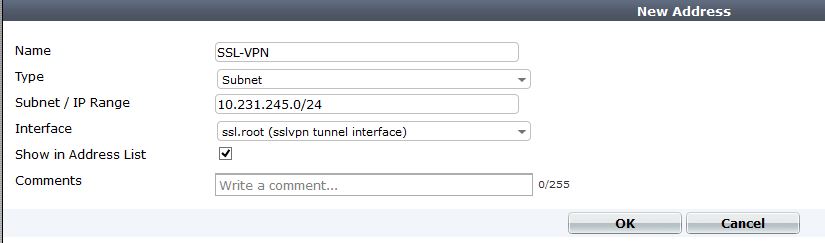


I have trouble with ssl vpn. I havel multiple ssl portals and I have multiple policy witch ssl vpn.
When I connect via ssl vpn I get ip address 10.28.32.1 and I split route
10.28.1.0/24 via 10.28.32.1 dev ppp0
$ ping 10.28.1.1
PING 10.28.1.1 (10.28.1.1) 56(84) bytes of data.
64 bytes from 10.28.1.1: icmp_seq=1 ttl=249 time=11.1 ms
64 bytes from 10.28.1.1: icmp_seq=2 ttl=249 time=6.13 ms
64 bytes from 10.28.1.1: icmp_seq=3 ttl=249 time=19.1 ms
show trace messages on console
# diag debug flow trace start 100
# diag debug enable
# id=13 trace_id=23 msg=”vd-CUST received a packet(proto=1, 10.28.32.1:26621->10.28.1.1:8) fromssl.CUST. code=8, type=0, id=26621, seq=1.”
id=13 trace_id=23 msg=”allocate a new session-008266b4″
id=13 trace_id=23 msg=”find a route: flags=00000000 gw-172.21.1.1 via internal”
id=13 trace_id=23 msg=”use addr/intf hash, len=3″
id=13 trace_id=23 msg=”find SNAT: IP-172.21.1.254, port-62464″
id=13 trace_id=23 msg=”Allowed by Policy-50: SNAT”
id=13 trace_id=23 msg=”SNAT 10.28.32.1->172.21.1.254:62464″
interfaces=[any]
filters=[host 10.28.1.1]
2.421885 ssl.CUST in 10.28.32.1 -> 10.28.1.1: icmp: echo request
2.422775 internal out 172.21.1.254 -> 10.28.1.1: icmp: echo request
2.427052 internal in 10.28.1.1 -> 172.21.1.254: icmp: echo reply
2.427159 ssl.CUST out 10.28.1.1 -> 10.28.32.1: icmp: echo reply
(50) # show
config firewall policy
edit 50
set srcintf “wan1_CUST”
set dstintf “internal”
set srcaddr “all”
set dstaddr “LAN_net-BRANCH”
set action ssl-vpn
set identity-based enable
config identity-based-policy
edit 1
set schedule “always”
set utm-status enable
set groups “Bilina_static”
set users “test”
set service “ALL”
set sslvpn-portal “VPN_IP_BRANCH”
set av-profile “default”
set ips-sensor “default”
set application-list “default”
set profile-protocol-options “default”
next
end
next